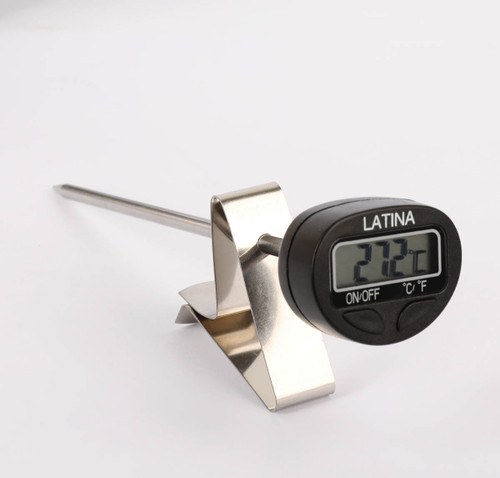
BLANCO DIGITAL LOLLIPOP THERMOMETER
Spesifikasi:
Jangkauan ukur: -20°C ~ 250°C
Pembagian: 0,1°C
Ukuran LCD: 28,5 x 13,5 mm
Batang: Food grade; 304 Stainless steel
Diameter: 3,56 mm
Panjang: 120 mm
Power: 1 x CR2032 Baterai Kancing
Berat: 22,48 g dengan pelindung
Produk berikut termasuk jepitan/clip
Tampilan:
MAX: Indikasi suhu maksimal yang bisa diukur oleh termometer.
MIN: Indikasi suhu minimum yang bisa diukur oleh termometer.
HOLD: Termometer berada pada status mode HOLD.
- : tanda minus
°C : derajat Celsius
°F : Derajat Farenheit
Cara Penggunaan Blanco Digital Lollipop Thermometer:
Menghidupkan/Menyalakan
- Tarik penyekat baterai sebelum digunakan.
- Tekan tombol o/- untuk menyalakan maka suhu ruangan akan terbaca.
Perubahan Unit °C/°F
- °C adalah unit yang setting awal termometer, nyalakan termometer, tekan tombol power lagi, unit ukur dapat diubah, dan setelah 3 detik maka unit akan berfungsi.
Mengukur Suhu
- Untuk mengukur suhu, masukan batang ukur ke barang yang akan diukur.
Fungsi Data LOCK/HOLD
- Tekan tombol power ketika mengukur, temperatur akan terkunci ke titik ukur degan indikasi HOLD.
- Tekan tombol power sekali lagi untuk mengembalikan ke posisi semula.
Temperatur Maximum/Minimum
- Tekan tombol power 2x secara cepat, termometer akan masuk ke mode MAX, dan huruf MAX akan tampil di LCD, bacaan akan menampilkan temperatur maksimal ukur.
- Tekan tombol power sekali, termometer akan masuk ke mode baca MIN, yang terindikasi di layar LCD. Bacaan akan mengindikasi suhu ukur terendah.
- Tekan tombol power sekali untuk memindahkan antara moda MAX/MIN, Tekan tombol power cepat 2x akan kembali ke moda ukur normal.
Penggantian Baterai
- Silakan mengganti baterai apabila sudah ada indikasi LOW di layar.
Power OFF
- Matikan termometer dengan cara menekan terus tombol power sampai tidak menyala.
- Unit akan auto OFF setelah 5 menit tanpa ada perubahan suhu <= 3°C
Pembersihan
- Angkat baterai bila ingin dicuci
- Bersihkan termometer dengan kain lembab. Jangan merendam termometer dalam air atau cairan, atau menggunakan cairan korosif.
PERHATIAN!
- Hati-hati memindahkan batang ukur supaya tidak terjadi kecelakaan atau rusak.
- Jauhkan termometer dan baterai dari jangkauan anak-anak.
- Jangan menyentuh batang ukur dengan tangan saat mengukur atau setelah selesai mengukur.
- Jangan memakai termometer pada oven microwave.
- Hindari unit terkena uap air, air atau lingkugan dengan kelembaban tinggi, atau teremdam dalam air atau cairan yang dapat merusak unit.
----------------------------------------------------------------------------
Specification:
Measuring range: -20 °C ~ 250 °C
Division: 0.1 °C
LCD size: 28.5 x 13.5 mm
Rod: Food grade; 304 Stainless steel
Diameter: 3.56 mm
Length: 120 mm
Power: 1 x CR2032 Button Battery
Weight: 22.48 g with protection
The following products include clips / clips
Appearance:
MAX: Indication of the maximum temperature that can be measured by a thermometer.
MIN: Indicative of the minimum temperature that can be measured by a thermometer.
HOLD: The thermometer is in the HOLD mode status.
-: minus sign
° C: degrees Celsius
° F: Degree of Farenheit
How to use Blanco Digital Lollipop Thermometer:
Turn on
- Pull out the battery divider before using.
- Press the o / - button to turn on the room temperature will be read.
Unit Change °C / °F
- °C is the unit that defaults to the thermometer, turns on the thermometer, press the power button again, the unit of measure can be changed, and after 3 seconds the unit will function.
Measuring Temperature
- To measure temperature, insert the measuring rod into the item to be measured.
LOCK/HOLD data function
- Press the power button when measuring, the temperature will be locked to the measuring point with HOLD indication.
- Press the power button again to return to its original position.
Maximum/Minimum Temperature
- Press the power button 2x quickly, the thermometer will enter the MAX mode, and the letter MAX will appear on the LCD, the reading will display the maximum temperature measured.
- Press the power button once, the thermometer will enter the MIN reading mode, which is indicated on the LCD screen. The reading will indicate the lowest measuring temperature.
- Press the power button once to move between MAX / MIN modes, Press the fast power button 2x will return to normal measuring mode.
Battery Replacement
- Please replace the battery if there is an LOW indication on the screen.
Power OFF
- Turn off the thermometer by pressing and holding the power button until it does not turn on.
- The unit will auto OFF after 5 minutes without any change in temperature <= 3 ° C
Cleaning
- Lift the battery if you want to wash it
- Clean the thermometer with a damp cloth. Do not immerse the thermometer in water or liquid, or use corrosive liquids.
ATTENTION!
- Carefully move the measuring rod to prevent accident or damage.
- Keep the thermometer and battery out of the reach of small children.
- Do not touch the measuring rod by hand when measuring or after measuring.
- Do not use a thermometer in a microwave oven.
- Avoid exposing the unit to moisture, water or environments with high humidity, or submerged in water or liquids that can damage the unit.